
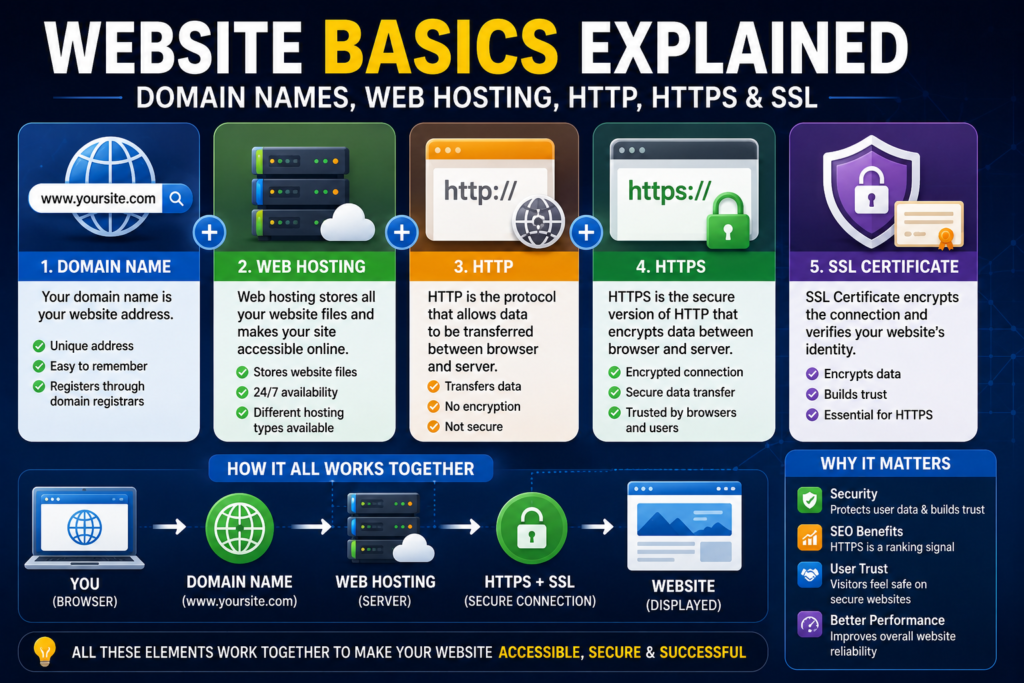

If you’ve ever wanted to create a website, start a blog, launch an online business, or simply understand how websites work, you’ve probably come across terms like domain name, web hosting, HTTP, HTTPS, and SSL certificate. While these terms may seem technical at first, they’re actually the building blocks of every website on the internet.
Whether you’re visiting a personal blog, an online store, a news website, or a global business platform, these technologies work together behind the scenes to make websites accessible, secure, and fast.
Understanding these concepts is essential for website owners, developers, digital marketers, bloggers, freelancers, and anyone interested in building an online presence. Knowing the difference between a domain name and web hosting, or understanding why HTTPS and SSL are important, can help you make better decisions when launching and managing a website.
In this complete beginner’s guide, you’ll learn exactly how websites work, what each of these technologies does, why they’re important, and how they all connect to deliver a secure and reliable browsing experience.
Let’s start with the basics.
How Does a Website Work?
Before learning about domains and hosting, it’s helpful to understand what happens when someone visits a website.
Imagine typing a website address into your browser, such as:
Within just a few seconds, several processes happen automatically behind the scenes.
Here’s a simplified overview:
- You enter a website address into your browser.
- The browser looks up the website’s domain name.
- The domain points to a web hosting server.
- The server receives your request.
- The server sends the website’s files back to your browser.
- Your browser displays the website on your screen.
Although this entire process happens almost instantly, it involves several technologies working together.
Without a domain name, visitors wouldn’t know where to find your website.
Without web hosting, there would be no website files to display.
Without HTTPS and SSL, your connection wouldn’t be encrypted, leaving sensitive information vulnerable to attackers.
Now let’s examine each component in detail.
What Is a Domain Name?
A domain name is the unique address people type into their browser to visit a website.
Examples include:
- google.com
- apple.com
- wikipedia.org
- iconix.online
Instead of remembering long numerical IP addresses like 192.168.xxx.xxx, users simply type an easy-to-remember domain name.
Think of a domain name as the street address of your house.
People don’t need to know the exact GPS coordinates—they simply use your address to find you.
Similarly, browsers use domain names to locate the correct web server that hosts a website.
Parts of a Domain Name
Every domain consists of different sections.
For example:
iconix.online
- ICONIX is the website’s unique name.
- .online is called the Top-Level Domain (TLD).
Popular TLDs include:
- .com
- .net
- .org
- .online
- .io
- .co
- .store
- .edu
- .gov
Choosing the right domain name is important because it represents your brand, improves recognition, and makes your website easier to remember.
Tips for Choosing a Good Domain Name
When registering a new domain, keep these best practices in mind:
- Keep it short and memorable.
- Make it easy to spell.
- Avoid numbers and unnecessary hyphens.
- Choose a name related to your business or niche.
- Use a trusted domain extension whenever possible.
- Ensure the name is unique and easy to pronounce.
A strong domain name can improve branding and make it easier for visitors to return to your website.
What Is Web Hosting?
If your domain name is your website’s address, web hosting is the building where everything inside your website is stored.
Web hosting is a service that stores your website’s files—including images, videos, code, databases, and documents—on powerful computers called servers.
These servers remain connected to the internet 24 hours a day, allowing visitors to access your website anytime, from anywhere in the world.
Without web hosting, your website simply wouldn’t be available online.
How Web Hosting Works
When someone types your domain name into their browser, the following process takes place:
- The browser finds your domain name.
- The domain directs the request to your hosting server.
- The hosting server processes the request.
- Website files are retrieved.
- The browser displays your website within seconds.
This process happens every single time someone visits your site.
The quality of your hosting service directly affects your website’s speed, uptime, security, and overall performance.
Different Types of Web Hosting
Not all hosting services are the same. Different websites have different needs depending on their traffic, budget, and technical requirements.
The most common types include:
Shared Hosting
Multiple websites share the same server resources.
Best for:
- Personal blogs
- Small business websites
- Beginners
- Portfolio websites
VPS Hosting
A Virtual Private Server provides dedicated resources within a shared physical server.
Best for:
- Growing businesses
- Medium-sized websites
- Developers
- Online stores
Cloud Hosting
Cloud hosting distributes your website across multiple servers, improving scalability and reliability.
Best for:
- High-traffic websites
- Large businesses
- SaaS platforms
- Growing online businesses
Dedicated Hosting
A dedicated server gives one customer complete control over an entire physical server.
Best for:
- Enterprise websites
- Large applications
- High-security environments
- Websites with massive traffic
Domain Name vs Web Hosting
Many beginners confuse these two terms, but they serve completely different purposes.
| Domain Name | Web Hosting |
|---|---|
| Website address | Storage for website files |
| Helps visitors find your website | Keeps your website online |
| Registered through a domain registrar | Purchased from a hosting provider |
| Example: iconix.online | Server where your website is stored |
Simply put:
Domain = Your Website Address
Hosting = Your Website’s Home
You need both to launch a fully functional website.
What Is HTTP?
Whenever you visit a website, your browser and the web server need a way to communicate. That communication happens using a protocol called HTTP, which stands for HyperText Transfer Protocol.
HTTP is a set of rules that allows your browser to request webpages, images, videos, and other website resources from a server.
For example, when you type a website address into your browser, an HTTP request is sent to the server. The server then processes the request and returns the website’s files, allowing your browser to display the page.
Although HTTP has been the foundation of the web for many years, it has one major drawback—it does not encrypt the data being transferred.
This means that information exchanged between your browser and a website can potentially be intercepted by attackers, especially when using unsecured networks.
What Is HTTPS?
HTTPS stands for HyperText Transfer Protocol Secure.
It works exactly like HTTP but adds an important layer of security by encrypting all data transferred between your browser and the website.
With HTTPS enabled:
- Login credentials remain protected.
- Payment information is encrypted.
- Personal data is secured.
- Communication cannot be easily intercepted.
Today, HTTPS has become the standard for modern websites, especially those that collect user information or process online payments.
When you visit a secure website, you’ll usually see a padlock icon next to the website address in your browser.
That padlock indicates that the website is using HTTPS and that your connection is encrypted.
What Is an SSL Certificate?
An SSL (Secure Sockets Layer) Certificate is a digital certificate that enables HTTPS by encrypting the connection between a user’s browser and the website’s server.
Although modern encryption technically uses TLS (Transport Layer Security), the term SSL certificate is still widely used across the internet.
When a website installs an SSL certificate:
- Data is encrypted before being transmitted.
- Browsers can verify the website’s identity.
- Visitors gain confidence that they’re connected to the correct website.
Without an SSL certificate, a website cannot properly use HTTPS.
How SSL Encryption Works
Encryption may sound complicated, but the concept is simple.
Imagine sending an important letter.
Without encryption, it’s like mailing a postcard—anyone handling it could read the contents.
With SSL encryption, it’s like placing that letter inside a locked safe that only the intended recipient can open.
When someone visits your website:
- The browser requests a secure connection.
- The server presents its SSL certificate.
- The browser verifies the certificate.
- A secure encrypted connection is established.
- All data exchanged between the browser and server becomes protected.
This entire process usually happens within a fraction of a second.
HTTP vs HTTPS: What’s the Difference?
Both protocols are used to transfer data between your browser and a website, but they differ significantly in terms of security.
| Feature | HTTP | HTTPS |
|---|---|---|
| Encryption | ❌ No | ✅ Yes |
| Data Protection | ❌ None | ✅ Encrypted |
| Browser Trust | ❌ Lower | ✅ Higher |
| Google SEO Preference | ❌ No | ✅ Yes |
| Suitable for Login Pages | ❌ No | ✅ Yes |
| Safe for Online Payments | ❌ No | ✅ Yes |
If you’re launching a new website today, there is almost never a reason to choose HTTP over HTTPS.
Why Every Website Needs SSL
Many people think SSL certificates are only necessary for e-commerce websites, but that’s no longer true.
Every website—whether it’s a blog, portfolio, business site, or online store—benefits from HTTPS.
Better Security
SSL protects sensitive information from hackers and reduces the risk of data interception.
Improved SEO
Search engines such as Google consider HTTPS a positive ranking signal.
Although it’s only one of many ranking factors, using HTTPS can contribute to better search visibility.
Increased Visitor Trust
Modern browsers often display warnings when websites are not secure.
These warnings can discourage visitors from continuing to your site.
A secure connection helps build credibility and confidence.
Protection for Login Forms
Even simple contact forms or login pages should be protected with encryption.
SSL ensures that submitted information is transmitted securely.
Common Website Security Mistakes
Many website owners unknowingly leave their sites vulnerable.
Avoid these common mistakes:
- Using HTTP instead of HTTPS.
- Delaying software and plugin updates.
- Using weak administrator passwords.
- Ignoring website backups.
- Installing plugins from untrusted sources.
- Using outdated PHP versions.
- Failing to enable two-factor authentication.
- Not monitoring website security.
Good security practices help protect both your website and your visitors.
Frequently Asked Questions
Can I create a website without web hosting?
No. A domain name alone is only an address. Your website files must be stored on a hosting server so visitors can access them.
Do I need both a domain name and web hosting?
Yes. The domain directs visitors to your website, while web hosting stores and serves the website’s content.
Is HTTPS mandatory?
While technically optional, HTTPS is strongly recommended and expected for modern websites. It improves security, visitor trust, and search engine optimization.
Does an SSL certificate improve SEO?
HTTPS is considered a ranking signal by search engines. While an SSL certificate alone won’t guarantee higher rankings, it supports better security and user trust—both of which contribute to a healthier website.
Can small websites use SSL?
Absolutely. Whether you run a personal blog, portfolio, company website, or online store, using HTTPS is considered a best practice.
Final Thoughts
Understanding how domain names, web hosting, HTTP, HTTPS, and SSL certificates work together is one of the most important first steps in building a successful website.
Think of your domain name as your website’s address, web hosting as the place where all your website files are stored, HTTP as the communication method between your browser and the server, HTTPS as the secure version of that communication, and an SSL certificate as the technology that makes secure encryption possible.
Together, these components form the foundation of every modern website. Whether you’re creating a personal blog, launching an online business, or managing a professional company website, choosing reliable hosting, registering a memorable domain name, and enabling HTTPS with an SSL certificate will help improve your website’s security, performance, credibility, and long-term success.
As the web continues to evolve, understanding these core technologies will make it easier to build, maintain, and grow a fast, secure, and trustworthy online presence.