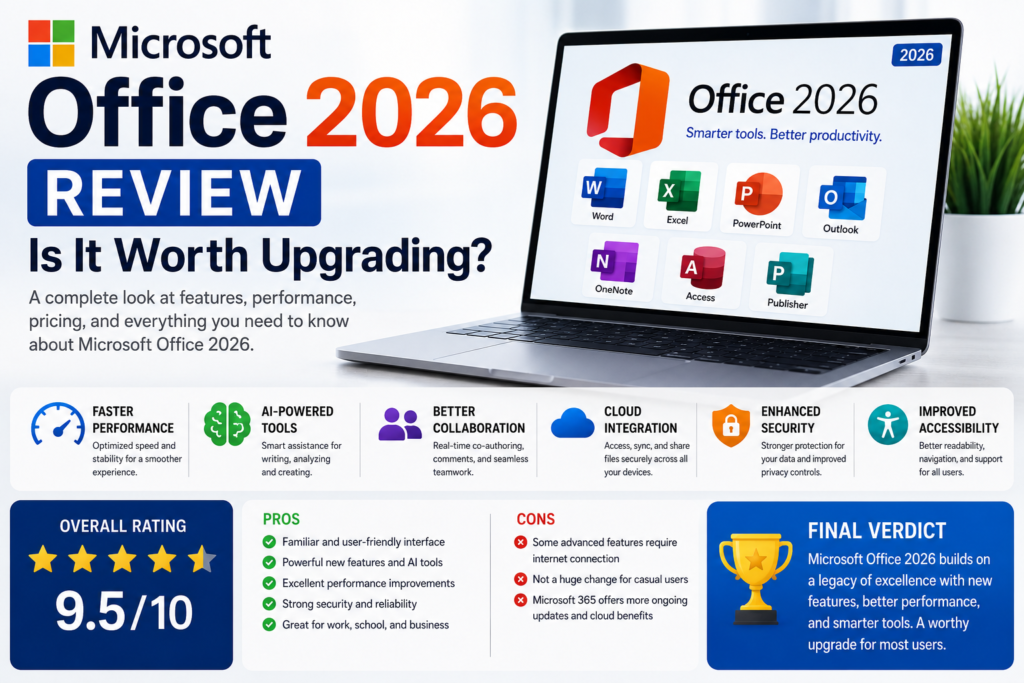

For decades, Microsoft Office has been the go-to productivity suite for students, professionals, businesses, and home users. Whether you’re creating documents in Word, managing spreadsheets in Excel, designing presentations in PowerPoint, or organizing emails with Outlook, Microsoft Office remains one of the most widely used software packages in the world.
As technology continues to evolve, users expect faster performance, smarter tools, stronger security, and better collaboration features. Microsoft Office 2026 aims to meet those expectations with a refined experience, enhanced AI-powered productivity features, improved cloud integration, and performance optimizations across its core applications.
But is upgrading to Microsoft Office 2026 the right choice? If you’re currently using Microsoft 365, Office 2021, or an older version, you may be wondering whether the new features justify the move.
In this detailed review, we’ll examine Microsoft’s latest productivity suite, explore its standout features, compare it with previous versions, discuss pricing and compatibility, and help you decide whether it’s the right investment for your needs.
Table of Contents
- What Is Microsoft Office 2026?
- What’s New in Office 2026?
- Core Applications Overview
- User Interface Improvements
- AI-Powered Productivity Features
- Performance and Speed
- Cloud Integration
- Collaboration Features
- Security Improvements
- Compatibility
- Pricing Overview
- Pros and Cons
- Microsoft 365 vs Office 2026
- Who Should Upgrade?
- Frequently Asked Questions
- Final Verdict
What Is Microsoft Office 2026?
Microsoft Office 2026 is Microsoft’s latest generation of productivity software, designed to help individuals and organizations create documents, analyze data, communicate effectively, and collaborate with others.
The suite includes many of the familiar applications users rely on every day, such as:
- Microsoft Word
- Microsoft Excel
- Microsoft PowerPoint
- Microsoft Outlook
- Microsoft OneNote
- Microsoft Access (Windows editions)
- Microsoft Publisher (where supported)
Building on previous versions, Office 2026 focuses on improving performance, usability, collaboration, and AI-assisted workflows while maintaining the familiar interface millions of users already know.
What’s New in Microsoft Office 2026?
Office 2026 introduces several enhancements designed to improve productivity and streamline everyday tasks.
Some of the most notable improvements include:
- Faster application startup
- Improved document collaboration
- Enhanced AI writing assistance
- Better Excel data analysis tools
- Modernized PowerPoint presentation features
- Improved Outlook organization
- Enhanced cloud synchronization
- Stronger security protections
- Better accessibility features
- Improved support for high-resolution displays
Many of these changes focus on refining the overall experience rather than completely redesigning the software.
Microsoft Word: Smarter Document Creation
Microsoft Word continues to be one of the most popular word processors available.
Office 2026 improves the writing experience with features such as:
Enhanced Writing Assistance
Built-in AI tools help users:
- Improve grammar
- Rewrite sentences
- Generate summaries
- Suggest clearer wording
- Improve readability
These tools can help writers produce polished documents more efficiently while still allowing full control over the final content.
Better Collaboration
Working with teammates is easier thanks to improvements in:
- Real-time editing
- Comments
- Version history
- Document sharing
- Cloud synchronization
This makes Word an excellent choice for businesses, students, and remote teams.
Microsoft Excel: More Powerful Than Ever
Excel remains one of the most capable spreadsheet applications available.
Office 2026 expands its capabilities with:
- Faster calculations
- Better chart options
- Improved PivotTable performance
- Smarter formulas
- Enhanced data visualization
- Easier data cleaning tools
These updates benefit everyone from students managing budgets to analysts working with large datasets.
Microsoft PowerPoint: Better Presentations with Less Effort
PowerPoint receives several quality-of-life improvements that make creating presentations faster and more engaging.
Highlights include:
- Improved design suggestions
- Enhanced animations
- Better presenter tools
- AI-assisted slide creation
- Higher-quality media support
- Improved collaboration
Whether you’re presenting in a classroom or a boardroom, these enhancements can help create more polished presentations.
Outlook: Smarter Email Management
Email remains a central part of modern communication, and Outlook continues to evolve.
Office 2026 introduces improvements such as:
- Better inbox organization
- Smarter search
- Faster synchronization
- Improved spam filtering
- Calendar enhancements
- Easier meeting scheduling
These refinements can help users spend less time managing email and more time focusing on important work.
Improved User Interface
Rather than introducing a dramatic redesign, Microsoft has refined the familiar Office interface.
Users will notice:
- Cleaner icons
- Better spacing
- Improved dark mode
- Faster navigation
- Simplified menus
- Improved accessibility
The result is an interface that feels modern without requiring users to relearn the software.
AI-Powered Productivity
Artificial intelligence plays a larger role in Office 2026.
AI-assisted features can help with tasks such as:
- Drafting content
- Summarizing documents
- Creating presentation outlines
- Formatting text
- Organizing spreadsheets
- Improving writing clarity
These tools are designed to assist users rather than replace their creativity or decision-making.
Better Performance
Microsoft has focused heavily on performance improvements.
Compared to older versions, Office 2026 aims to deliver:
- Faster startup times
- Reduced memory usage
- Smoother multitasking
- Better responsiveness
- Improved stability
Users with modern hardware are likely to notice quicker loading times and a more responsive experience.
Cloud Integration
Cloud connectivity continues to play an important role in Microsoft’s productivity ecosystem.
Office 2026 offers improved integration with cloud storage, making it easier to:
- Access files across devices
- Sync documents
- Share content with others
- Recover previous versions
- Continue work from different locations
This flexibility is especially valuable for remote workers and teams that collaborate across multiple devices.
Collaboration Features
Collaboration remains one of Office’s strongest features.
Users can:
- Share documents quickly
- Edit files together in real time
- Leave comments
- Track changes
- Restore previous versions
- Manage permissions
These capabilities simplify teamwork while reducing version conflicts.
Microsoft Office 2026 Review: Is It Worth Upgrading? (Part 2)
Continue reading from Part 1
Security and Privacy Improvements
Security has become one of the most important aspects of modern productivity software. As cyber threats continue to evolve, Microsoft continues to improve the protection offered across its Office applications.
Some of the expected security improvements include:
- Enhanced document encryption
- Improved phishing protection in Outlook
- Better ransomware protection
- Secure cloud synchronization
- Stronger identity verification
- Automatic security updates
- Improved file recovery options
For businesses handling confidential information, these improvements can help reduce security risks while maintaining productivity.
Performance and Stability
One of the biggest reasons users upgrade Office is improved performance.
Office 2026 focuses on making everyday tasks smoother by reducing loading times and improving application responsiveness.
Performance Improvements
- Faster application startup
- Quicker file opening
- Improved memory management
- Better multitasking
- Smoother large Excel workbook performance
- Faster PowerPoint rendering
- Reduced crashes
Users with newer hardware are likely to experience the greatest performance improvements.
Microsoft Office 2026 System Requirements
Although official requirements may vary after release, modern versions of Microsoft Office generally require:
Windows
- Windows 11 or newer supported version
- Modern multi-core processor
- Minimum 8 GB RAM (recommended)
- SSD storage for best performance
- Internet connection for updates and cloud services
macOS
- Recent supported version of macOS
- Apple Silicon or Intel processor (where supported)
- Minimum 8 GB RAM
- Available storage for installation
- Internet connection
Before upgrading, always verify compatibility with your operating system and hardware.
Microsoft 365 vs Office 2026
One of the most common questions users ask is whether they should purchase Microsoft Office or subscribe to Microsoft 365.
| Feature | Microsoft Office 2026 | Microsoft 365 |
|---|---|---|
| Payment | One-time purchase | Monthly or yearly subscription |
| Feature Updates | Limited to security and maintenance updates | Continuous feature updates |
| Cloud Storage | Limited | Included with subscription |
| Collaboration | Basic | Advanced |
| AI Features | May vary by edition | Typically receives the newest AI capabilities first |
| Best For | Users who prefer a one-time purchase | Users who want ongoing updates and cloud services |
If you prefer paying once and keeping the same version for years, Office 2026 may be the better option.
If you always want the latest features, cloud services, and ongoing improvements, Microsoft 365 is generally the stronger choice.
Pros
Office 2026 offers several advantages for both personal and professional users.
Advantages
✔ Familiar interface
✔ Improved performance
✔ Better collaboration
✔ Enhanced writing tools
✔ Powerful Excel improvements
✔ Improved presentation features
✔ Better accessibility
✔ Strong security
✔ Reliable productivity applications
✔ Excellent compatibility with Microsoft file formats
Cons
No software is perfect, and Office 2026 may not be the ideal solution for everyone.
Disadvantages
- Some advanced features may require an internet connection.
- AI-powered capabilities may depend on additional services or subscriptions.
- Older computers may not benefit as much from the latest performance enhancements.
- Users who always want new features may find Microsoft 365 more suitable.
Who Should Upgrade?
Office 2026 is likely to be a good choice for:
Students
Ideal for writing assignments, creating presentations, and organizing research.
Business Professionals
Excellent for document creation, spreadsheets, meetings, and communication.
Small Businesses
Provides familiar productivity tools without requiring ongoing subscription costs.
Home Users
Suitable for budgeting, personal documents, planning, and everyday productivity.
Content Creators
Useful for organizing projects, creating reports, managing schedules, and collaborating with clients.
Who Might Skip the Upgrade?
You may not need Office 2026 if:
- You’re satisfied with your current version and it meets your needs.
- You already use Microsoft 365 and receive continuous feature updates.
- Your work relies mainly on web-based office applications.
- Your computer doesn’t meet the recommended system requirements.
Evaluate your workflow before deciding to upgrade.
Frequently Asked Questions
Is Microsoft Office 2026 free?
No. Microsoft Office has traditionally been offered as a paid product, although Microsoft also provides free web-based versions of some Office apps with limited functionality.
Can I use Office 2026 without the internet?
Yes. Core desktop applications are generally designed to work offline, though some cloud-based features and updates require an internet connection.
Does Office 2026 include Word, Excel, and PowerPoint?
Yes. These core productivity applications are expected to remain central components of the Office suite.
Is Office 2026 better than Office 2021?
Office 2026 is expected to provide performance improvements, enhanced collaboration, refined user experiences, and additional productivity features compared with earlier standalone releases.
Is Microsoft 365 better than Office 2026?
It depends on your needs.
Microsoft 365 is ideal for users who want continuous updates, cloud storage, and the newest features.
Office 2026 is better suited to users who prefer a one-time purchase and don’t require subscription-based services.
Is Office 2026 good for students?
Yes. Word, Excel, PowerPoint, and Outlook continue to make Office one of the strongest productivity suites for education.
Final Verdict
Microsoft Office has remained the industry standard for productivity software because of its reliability, familiar interface, and comprehensive set of tools. The anticipated improvements in Office 2026 continue this tradition by focusing on faster performance, enhanced collaboration, stronger security, and smarter productivity features.
For users upgrading from much older versions of Office, the improvements are likely to provide a smoother and more efficient experience. Those already using Microsoft 365, however, may already have access to many of the latest innovations through their subscription.
Ultimately, the right choice depends on how you work. If you prefer owning your software with a one-time purchase, Office 2026 could be an appealing option once officially available. If you prioritize constant feature updates, cloud integration, and the latest AI-powered capabilities, Microsoft 365 remains the more flexible solution.
Overall Rating
| Category | Rating |
|---|---|
| Ease of Use | ⭐⭐⭐⭐⭐ |
| Performance | ⭐⭐⭐⭐⭐ |
| User Interface | ⭐⭐⭐⭐⭐ |
| Features | ⭐⭐⭐⭐⭐ |
| Security | ⭐⭐⭐⭐⭐ |
| Collaboration | ⭐⭐⭐⭐⭐ |
| Value for Money | ⭐⭐⭐⭐☆ |
| Overall Score | 9.5/10 |