
Phishing emails have become one of the most common and dangerous forms of cybercrime. Every day, millions of fraudulent emails are sent to people around the world, attempting to steal passwords, banking details, personal information, and even business data.
What makes phishing attacks so effective is that they often look legitimate. Cybercriminals carefully design fake emails to resemble messages from trusted companies such as banks, online stores, delivery services, social media platforms, and even government organizations. At first glance, these emails may appear completely genuine, making it difficult for many users to recognize the scam.
In recent years, phishing techniques have become even more sophisticated. Attackers now use artificial intelligence, convincing branding, personalized messages, and fake websites that closely mimic real ones. A single click on a malicious link or attachment can lead to identity theft, financial loss, malware infections, or unauthorized access to your accounts.
The good news is that most phishing attacks can be avoided if you know what warning signs to look for.
In this guide, you’ll learn how phishing emails work, the most common red flags, real-world examples, and practical steps you can take to protect yourself, your family, and your business.
What Is a Phishing Email?
A phishing email is a fraudulent message designed to trick recipients into revealing sensitive information or performing actions that benefit cybercriminals.
Instead of exploiting software vulnerabilities, phishing attacks exploit human trust. Attackers rely on fear, urgency, curiosity, or excitement to persuade victims to click malicious links, download infected attachments, or enter confidential information on fake websites.
The goal of a phishing email may include:
- Stealing login credentials
- Accessing online banking accounts
- Collecting credit card information
- Installing malware
- Spreading ransomware
- Hijacking email accounts
- Collecting personal information
- Committing identity theft
Phishing remains one of the most successful cyberattack methods because it targets people rather than technology.
Why Phishing Emails Are Becoming More Dangerous
Years ago, phishing emails were often easy to identify because they contained poor grammar, suspicious formatting, and obvious spelling mistakes.
Today, that’s no longer the case.
Modern phishing campaigns use advanced tools, artificial intelligence, and publicly available information to create highly convincing emails.
Cybercriminals now imitate:
- Banks
- PayPal
- Amazon
- Microsoft
- Apple
- Netflix
- DHL
- FedEx
- Government agencies
- Employers
- Schools and universities
Some attacks even include your real name, company information, or recent online activity to appear more trustworthy.
Because these scams continue evolving, users must stay informed about the latest phishing techniques.
Common Types of Phishing Emails
Not every phishing email looks the same. Understanding the different types of attacks can help you recognize suspicious messages more quickly.
Credential Phishing
The attacker attempts to steal usernames and passwords by directing victims to a fake login page.
These emails often claim that:
- Your account has been locked.
- Your password has expired.
- Suspicious activity has been detected.
- You need to verify your identity immediately.
Banking Phishing
Cybercriminals pretend to represent banks or financial institutions.
They may claim:
- Unauthorized transactions were detected.
- Your debit card has been blocked.
- Your account requires verification.
- A payment has failed.
Victims are encouraged to click a link that leads to a fake banking website designed to capture login credentials.
Delivery Scams
These phishing emails pretend to come from shipping companies.
Examples include:
- “Your package couldn’t be delivered.”
- “Track your shipment.”
- “Delivery failed due to an incorrect address.”
- “Pay a small customs fee.”
The provided links often lead to malicious websites or payment scams.
Business Email Compromise (BEC)
Business Email Compromise is one of the most expensive forms of cybercrime.
Attackers impersonate:
- CEOs
- Managers
- HR departments
- Vendors
- Clients
They attempt to convince employees to:
- Transfer money.
- Share confidential documents.
- Purchase gift cards.
- Reveal company credentials.
These attacks rely heavily on trust and urgency.
AI-Generated Phishing
Artificial intelligence has made phishing emails more convincing than ever.
AI tools can help attackers:
- Write flawless emails.
- Match writing styles.
- Personalize messages.
- Translate content into multiple languages.
- Remove spelling and grammar mistakes.
As a result, users can no longer rely solely on poor language as an indicator of fraud.
10 Warning Signs of a Phishing Email
Learning to recognize the warning signs is your best defense against phishing attacks.
Let’s examine the most common red flags.
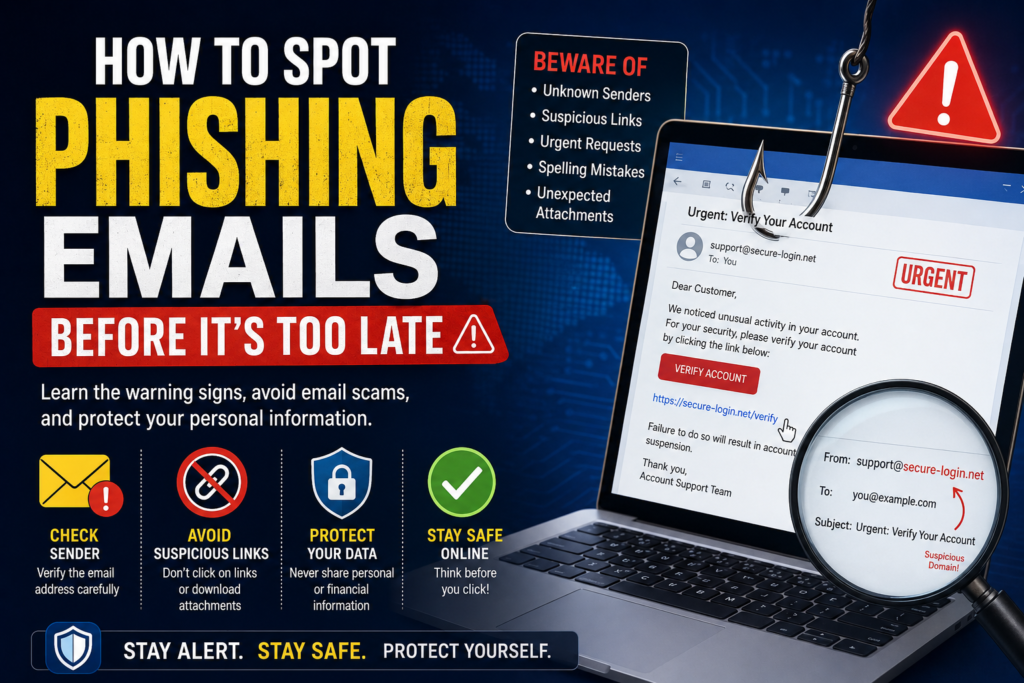
1. Suspicious Sender Email Address
The sender name may appear legitimate, but the actual email address often reveals the scam.
For example:
Legitimate
Suspicious
company.support.verify@randomdomain.xyz
Always inspect the full email address before clicking anything.
2. Urgent or Threatening Language
Phishing emails frequently create panic.
Examples include:
- Your account will be suspended today.
- Immediate action is required.
- Payment failed.
- Unauthorized login detected.
- Verify your account within one hour.
The goal is to pressure you into acting without thinking.
Whenever an email creates a sense of urgency, slow down and verify its authenticity through official channels.
3. Unexpected Links
Never assume a hyperlink leads where it claims.
Before clicking:
- Hover your mouse over the link on a computer.
- Check whether the destination matches the official website.
- Be cautious of shortened URLs or domains with unusual spellings.
For example:
Real:
Fake:
https://paypal-security-login.example.com
Small differences in web addresses can indicate a phishing attempt.
4. Poor Personalization
Many phishing campaigns begin with generic greetings such as:
- Dear Customer
- Dear User
- Valued Member
- Account Holder
Legitimate companies often address you by your name or account details, especially if you’ve previously registered with them.
While generic greetings alone don’t prove an email is malicious, they should encourage you to examine the message more carefully.
5. Unexpected Attachments
Be extremely cautious if you receive an attachment you weren’t expecting.
Common malicious file types include:
- ZIP files
- EXE programs
- JavaScript files
- Macro-enabled Office documents
- Unknown PDFs
Never open unexpected attachments without verifying the sender first.
6. Requests for Sensitive Information
Legitimate companies rarely ask you to provide sensitive information through email.
Be suspicious if an email asks for:
- Passwords
- Banking information
- Credit card numbers
- Social Security or national ID numbers
- One-time verification codes (OTP)
- Security questions
Even if the email appears to come from a trusted organization, never reply with confidential information. Instead, visit the company’s official website or contact them directly using verified contact details.
7. Grammar and Formatting Mistakes
While AI has made phishing emails more convincing, many scams still contain unusual wording, awkward formatting, or inconsistent branding.
Watch for:
- Random capitalization
- Strange sentence structure
- Low-quality logos
- Broken images
- Different fonts
- Poor spacing
These issues don’t always mean an email is fake, but they should encourage you to investigate further.
8. Offers That Sound Too Good to Be True
Cybercriminals often use exciting offers to attract victims.
Examples include:
- You’ve won a brand-new smartphone.
- Claim your cash prize now.
- Receive a free vacation.
- Your account qualifies for a special reward.
- Limited-time exclusive offer.
If you weren’t expecting the offer, verify it through the company’s official website before taking any action.
9. Unusual Requests from Someone You Know
Not all phishing attacks come from strangers.
Sometimes hackers compromise a friend’s or coworker’s email account and send convincing messages from it.
If someone unexpectedly asks you to:
- Send money
- Purchase gift cards
- Share confidential files
- Click an unfamiliar link
Contact them through another trusted method before responding.
10. Messages That Create Fear or Excitement
Phishing relies on emotion.
Attackers know people make poor decisions when they panic or become overly excited.
Common emotional triggers include:
- Fear of losing an account
- Excitement about winning a prize
- Curiosity about a package
- Concern over suspicious activity
- Pressure to act immediately
Whenever an email triggers a strong emotional reaction, pause and verify the information first.
Real Examples of Phishing Emails
Here are a few common phishing scenarios.
Example 1: Fake Bank Alert
Subject: Urgent: Suspicious Activity Detected
The email claims someone accessed your bank account and asks you to verify your identity by clicking a link.
Reality: The link leads to a fake banking website designed to steal your login credentials.
Example 2: Fake Package Delivery
Subject: Delivery Failed – Update Your Address
The email asks you to pay a small shipping fee or confirm your address.
Reality: The payment page is fake, and your financial information may be stolen.
Example 3: Fake Microsoft or Google Login
Subject: Your Account Storage Is Full
The email encourages you to sign in immediately to avoid losing access.
Reality: The login page is designed to capture your username and password.
What Should You Do If You Clicked a Phishing Link?
If you accidentally interact with a phishing email, act quickly.
Step 1: Disconnect from the Internet
If you downloaded a suspicious file, disconnect your device from the internet to reduce the risk of malware communicating with attackers.
Step 2: Change Your Passwords
Immediately update the password for the affected account, along with any other accounts that use the same password.
Use a unique, strong password for every account.
Step 3: Enable Two-Factor Authentication (2FA)
Adding two-factor authentication provides an extra layer of security even if your password has been compromised.
Step 4: Scan Your Device
Run a full antivirus or anti-malware scan to detect and remove any malicious software.
Step 5: Monitor Your Accounts
Keep an eye on:
- Bank statements
- Credit card activity
- Email logins
- Social media accounts
Report any suspicious activity immediately.
How to Protect Yourself from Phishing Emails
The best defense is prevention.
Follow these cybersecurity best practices:
- Verify the sender before opening attachments.
- Never click suspicious links.
- Enable two-factor authentication.
- Keep your operating system updated.
- Use strong, unique passwords.
- Install trusted antivirus software.
- Avoid logging into sensitive accounts on public Wi-Fi.
- Learn to recognize common phishing tactics.
- Back up important files regularly.
- Stay informed about the latest online scams.
Building safe online habits dramatically reduces your risk.
Best Tools to Help Prevent Phishing
Several trusted tools can help protect against phishing attacks.
Useful options include:
- Email spam filters
- Password managers
- Antivirus software
- Secure web browsers
- DNS security services
- Multi-factor authentication apps
No single tool can stop every attack, but combining these protections creates a much stronger defense.
Frequently Asked Questions
What is the biggest sign of a phishing email?
The biggest warning sign is an unexpected request asking you to click a link, download an attachment, or provide sensitive information urgently.
Can phishing emails infect my computer?
Yes. Some phishing emails contain malicious attachments or links that install malware, ransomware, or spyware.
Are phishing emails only sent by hackers?
Phishing attacks are carried out by cybercriminals using fake identities that imitate trusted organizations or individuals.
Can two-factor authentication stop phishing?
Two-factor authentication greatly improves account security, but it isn’t a complete solution. Users should still verify emails carefully before entering credentials.
What should businesses do to prevent phishing?
Businesses should train employees regularly, enforce multi-factor authentication, use advanced email filtering, and establish procedures for verifying financial or sensitive requests.
Final Thoughts
Phishing emails continue to be one of the most effective methods cybercriminals use to steal personal information, financial data, and business credentials. As technology evolves, these scams become increasingly convincing, making awareness more important than ever.
Fortunately, protecting yourself doesn’t require advanced technical skills. By learning to recognize suspicious email addresses, urgent requests, fake links, unexpected attachments, and emotional manipulation, you can avoid the majority of phishing attacks before they cause harm.
Always take a moment to verify unexpected emails, keep your devices updated, use strong passwords, and enable two-factor authentication wherever possible. A few extra seconds of caution can prevent serious financial loss, identity theft, and compromised accounts.
Cybersecurity starts with informed decisions—and staying alert is one of the most effective defenses against phishing.